> For the complete documentation index, see [llms.txt](https://docs.trade.polynomial.fi/llms.txt). Markdown versions of documentation pages are available by appending `.md` to page URLs; this page is available as [Markdown](https://docs.trade.polynomial.fi/perp-v3-beta/trade-v2/trading-guide/take-profit-stop-loss.md).
# Take Profit / Stop Loss
Take Profit & Stop Loss
Take profit and stop loss orders enable traders to set target profit levels and maximum acceptable loss levels. Take profit and stop-loss orders provide a level of automation and help traders stick to their predefined trading plans.
### Opening a position with TP/SL
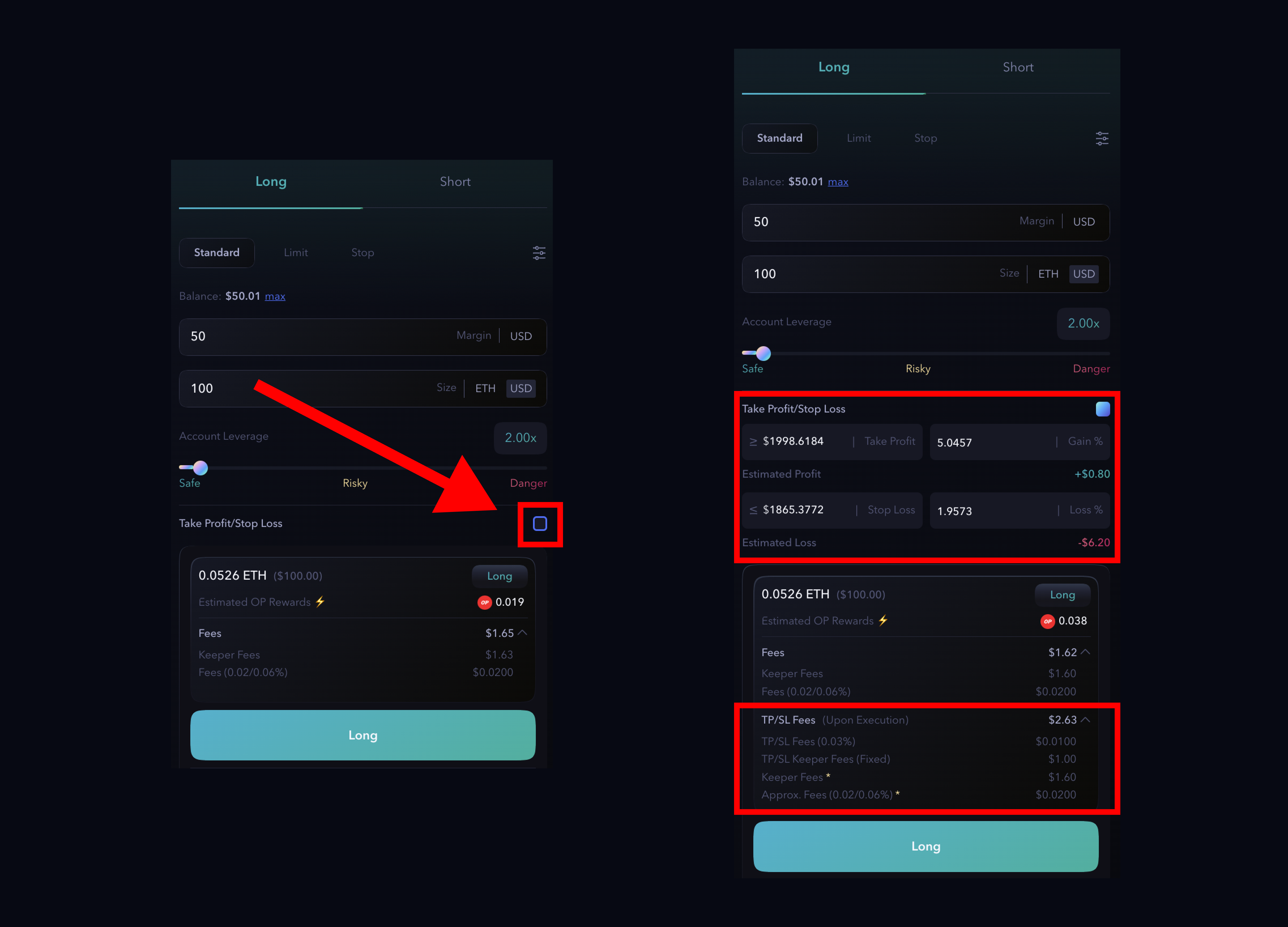
To allow traders to define both their target profit level and the maximum acceptable loss level, both orders can be placed simultaneously when entering a trade.
1. Decide the type of order you want to create between **`Standard`**, **`Limit`** or **`Stop`**;
2. Check the TP/SL box to abilitate it;
3. Enter the parameters to trigger TP and/or SL and click **`Long`** or **`Short`** button;
{% hint style="info" %}
Please note that fees associated with the Take Profit and Stop Loss orders will be deducted upon execution, when the specified price levels are triggered.\
**`Gain`** and **`Loss`** take into account the regular fees for the trades as well as the fees associated with creating the TP/SL orders.
{% endhint %}
TP/SL info & parameters
The TP/SL (and limit/stop type order) will be shown in the `Orders` tab, meanwhile the (standard) order executed by the keepers will be shown in the `Positions` tab;
TP/SL order
Market Order
When user opens a trade with **TP/SL** two different orders will be generated.
* The new trade position
* The TP/SL
Both the orders generated have same size
{% hint style="info" %}
Note: When you create **TP/SL** with a new position, it is not shown in the `Position` tab, but in the `Order` tab. This because the TP/SL correspond to a specific size and not to that particular position.
{% endhint %}
### Add TP/SL to a position
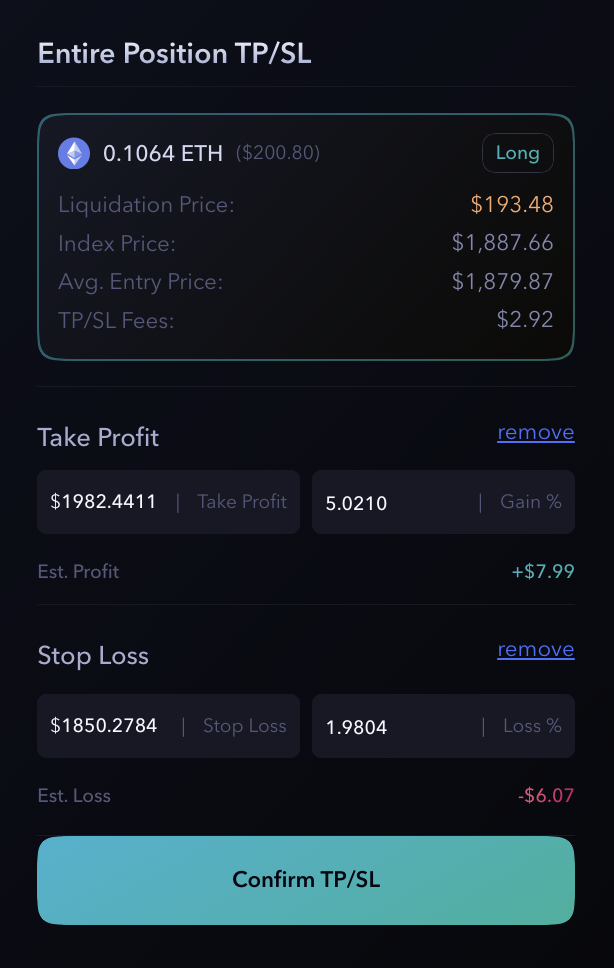
It is possible to add a TP/SL to an entire existing position:
1. Click the **`Add`** button;
2. A popup will appear and you can decide the trigger price for **TP** and/or **SL** for the entire position; and click **`Confirm TP/SL`**
{% hint style="info" %}
**Remember**: fees associated with the Take Profit and Stop Loss orders will be deducted upon execution, when the specified price levels are triggered.\
**`Gain`** and **`Loss`** take into account the regular fees for the trades as well as the fees associated with creating the TP/SL orders.
{% endhint %}
Once validate the transaction the TP/SL will be shown on `Order` tab and `Position` tab
{% hint style="info" %}
**TP/SL** is available in the position tab because it is related the whole position
{% endhint %}
Orders tab
Added TP/SL to an existing position
{% hint style="info" %}
**The main difference between creating a TP/SL order while opening a trade and adding it later is related to their association with the position.**
When TP/SL is established during the initial trade entry, it is linked to a specific trade size. In other words, the TP/SL is set based on the parameters defined at the time of opening the position.
On the other hand, when TP/SL is added later, it is specifically assigned to an existing position. This means that the TP/SL order is tailored to the characteristics and requirements of that particular position.
{% endhint %}
### Modify a TP/SL
It is possible to modify a TP/SL to an existing position clicking the **"*****Edit*****"** button in the Position tab.
After clicking, the popup similar [#add-tp-sl-to-a-position](#add-tp-sl-to-a-position "mention") will appear. A transaction will exectute this new TP/SL and cancel the previous one.
### Cancel a TP/SL
To cancel a TP/SL is enough to go on Orders tab and click **`Cancel`**
{% hint style="warning" %}
It is important to note that while these orders can be effective risk management tools, they are not foolproof. In certain market conditions, such as during **high volatility** or low liquidity, the execution of these orders may differ from the intended price level. This is known as **slippage** and can result in **trade executions at slightly different prices**.
**Traders should consider potential slippage and set their take profit and stop-loss levels accordingly to account for these factors.**
**Important:** A reasonable buffer between the stop-loss level and the liquidation price, traders can enhance their chances of preventing liquidation events.
{% endhint %}